
Manage ShowMeLocal Reviews
For business owners
- Sign in to your Business Dashboard.
- Select the business you want to manage.
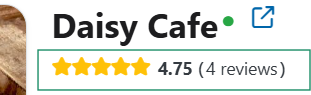
- Click on stars under the business name to proceed
For reviewers
- Sign in to your ShowMeLocal account.
- Open your account menu and select “My Reviews.”
- Find the review you posted.
- Select “Update” to edit it or “Delete” to remove it.
These controls apply only to reviews posted directly on ShowMeLocal. Reviews from Google or another website must be managed on the website where they were originally posted.